

Virality Threshold
Each clip gets a score from 0–100. The threshold slider goes from 80 to 100 in steps of 5, and starts at 80.
At or above threshold → auto-posted
Below threshold → kept in your project, not posted automatically (you can still post it yourself)
Recommended Settings
80: The most posts (default, best starting point)
85–90: Balanced, fewer but stronger posts
95–100: Only standout clips
Tip: Start at 80 and raise it if you want fewer, stronger posts.
Clip Duration
30 seconds → quick, high engagement
60 seconds → balanced (recommended)
90 seconds → detailed content
Best default: 60 seconds
Number of Clips
Sets the most clips the automation makes from each new video. You'll find the slider in Clip Settings, right under Layout.
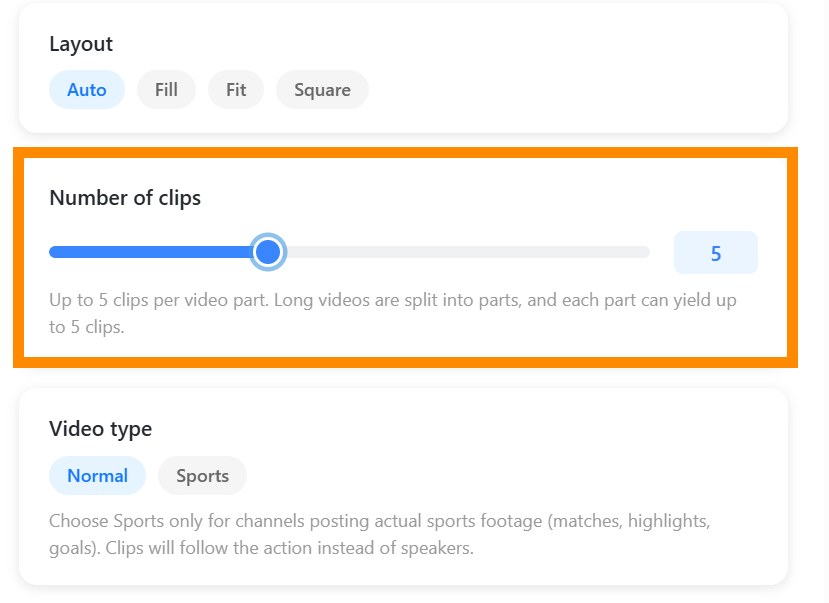
Auto (default) → the best clips, up to 12
1–4 → only the strongest moments
5–11 → more clips, still the highest-scoring ones
It's a limit, not a target: shorter or quieter videos may give fewer clips, and we never add weaker clips to reach your number. Long videos are processed in parts of up to 20 minutes, and the limit applies to each part.
Only clips at or above your Virality Threshold are auto-posted, so the two settings work together.
New Video Checks
We check your channel for new uploads automatically, about every 6 hours. There's nothing to set. You can see the last and next check on each automation card, and Check Now checks right away.
Template Selection
Controls subtitle and visual style.
Default works well for most cases.
Example Setup
Balanced Setup
Threshold: 85
Duration: 60 seconds
Number of clips: Auto (or 5 for fewer, stronger posts)
Changing Settings
You can update settings anytime.
Changes apply only to future videos.