
How to Upgrade or Downgrade Plan
Upgrading Your Subscription Plan
Upgrading your plan allows you to access additional features and credits immediately. Here's how it works:
How to Upgrade
Access Your Subscription Page:
Navigate to your account settings and select "Subscription."
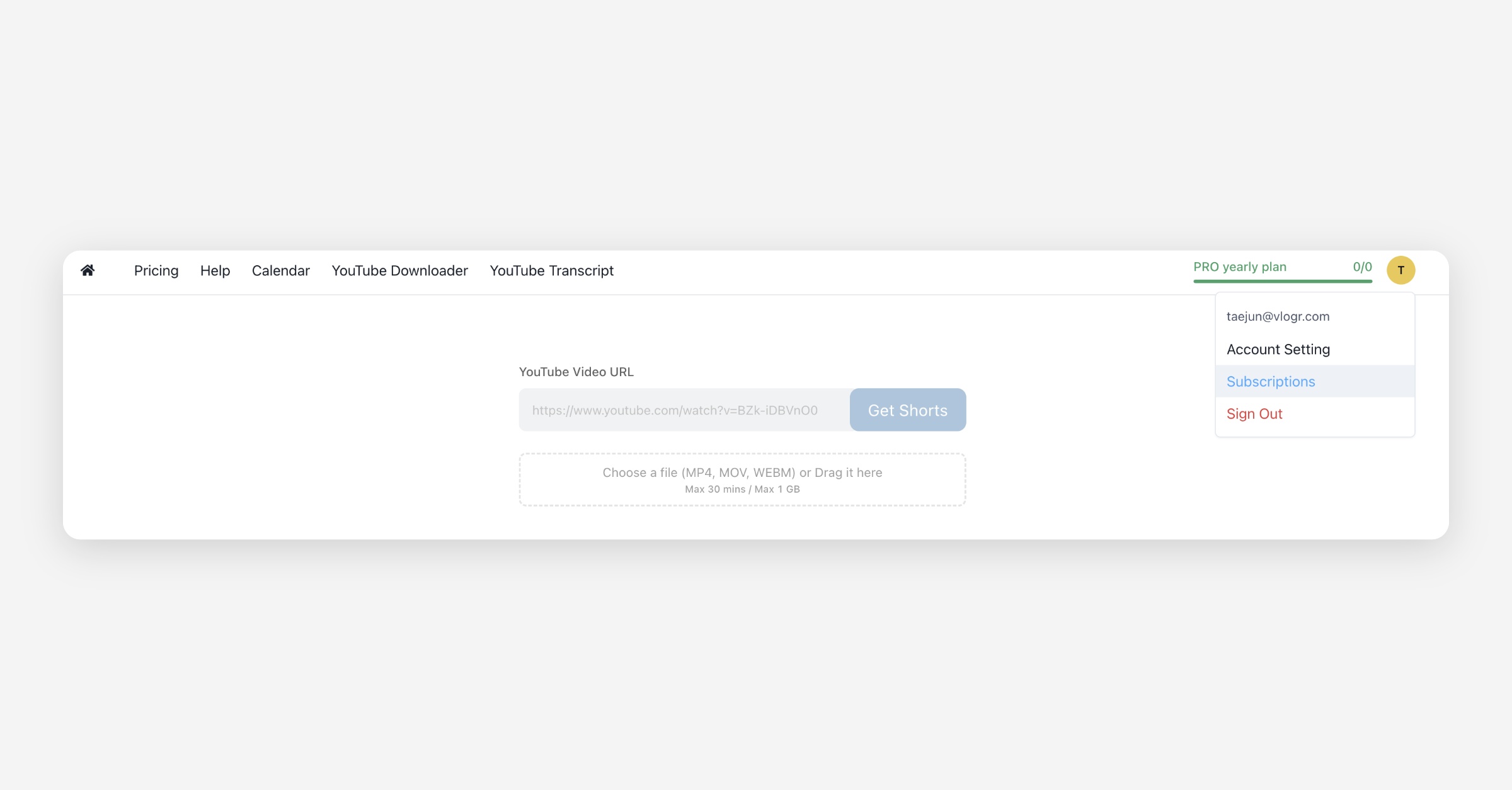
Choose Your New Plan:
Select the plan you wish to upgrade to (e.g., from Pro Monthly to Expert Monthly).
Confirm the Upgrade:
Review the proration details and confirm your selection.
Prorated Billing
When upgrading, you'll only be charged for the difference between your current plan and the new plan, adjusted for the remaining days in your billing cycle.
Example:
Current Plan: Pro Monthly ($15/month)
Upgrade To: Expert Monthly ($30/month)
Days Used: 20 out of 30 days
Calculation:
Determine Daily Rates:
Pro Plan: $15 / 30 days = $0.50 per day
Expert Plan: $30 / 30 days = $1.00 per day
Calculate Remaining Days:
30 days (total) - 20 days (used) = 10 days remaining
Calculate Prorated Amount:
Expert Plan: 10 days × $1.00/day = $10.00
Pro Plan: 10 days × $0.50/day = $5.00
Amount Due: $10.00 (Expert) - $5.00 (Pro) = $5.00
In this scenario, you would pay an additional $5.00 to upgrade immediately.
Credit Adjustments
Upon upgrading, your credits will adjust to reflect the new plan.
Example:
Current Plan Credits: 30 credits/month
Upgrade To: 60 credits/month
Credits Used: 20 credits
Calculation:
Determine Daily Credit Accrual:
Pro Plan: 30 credits / 30 days = 1 credit per day
Expert Plan: 60 credits / 30 days = 2 credits per day
Calculate Remaining Credits:
Pro Plan: 10 days × 1 credit/day = 10 credits
Expert Plan: 10 days × 2 credits/day = 20 credits
Total Credits After Upgrade:
10 credits (remained) + 20 credits (remaining 10 days credits of Expert) = 30 credits
After upgrading, you would have a total of 30 credits for the month.
If your credits don't update after upgrading
Payment for an upgrade can go through a moment before the new credit allowance applies. If you just upgraded, refresh your subscription page and check your balance again after a few minutes.
If the credits are still missing, contact support. Support corrects the balance manually using this formula:
new balance = new plan's credit allowance - credits already used this cycle
For example, if you upgrade from a 30-credit plan to a 60-credit plan and have already used 10 credits, the corrected balance is 50 credits (60 - 10), not the full 60.
If your card was charged for the upgrade but your credit balance still shows the old plan's amount after a few minutes, contact support with your account email and the time of the upgrade so they can apply the correct balance.
On yearly plans, your annual renewal date is your next billing date. Your plan's full credit allowance is recalculated on that date, so any correction made between renewals only affects your balance until then.
Downgrading Your Subscription Plan
If you find that your current plan exceeds your needs, you can downgrade to a lower-tier plan.
How to Downgrade
Access Your Subscription Page:
Navigate to your account settings and select "Subscription."
Choose Your New Plan:
Select the plan you wish to downgrade to (e.g., from Expert Monthly to Pro Monthly).
Confirm the Downgrade:
Review the changes and confirm your selection.
Effective Date
Downgrades take effect at the end of your current billing cycle. You will retain access to your current plan's features and credits until then.
Credit Expiry Policies
Understanding credit validity is essential for effective usage.
Monthly Plans: Credits expire 30 days after issuance, allowing them to roll over for one additional month.
Yearly Plans: Credits are valid for 12 months, providing extended flexibility.
If you cancel your subscription, any remaining credits will expire at their original expiration date, even if that is after your billing cycle ends.
Additional Notes
Unused Credits: Credits do not transfer between plans when switching from a higher-tier to a lower-tier subscription.
Refunds: Refunds are not provided for unused portions of downgraded plans, but credits remain available until the end of the billing cycle.
For any further questions, please contact our support team.
Was this helpful?